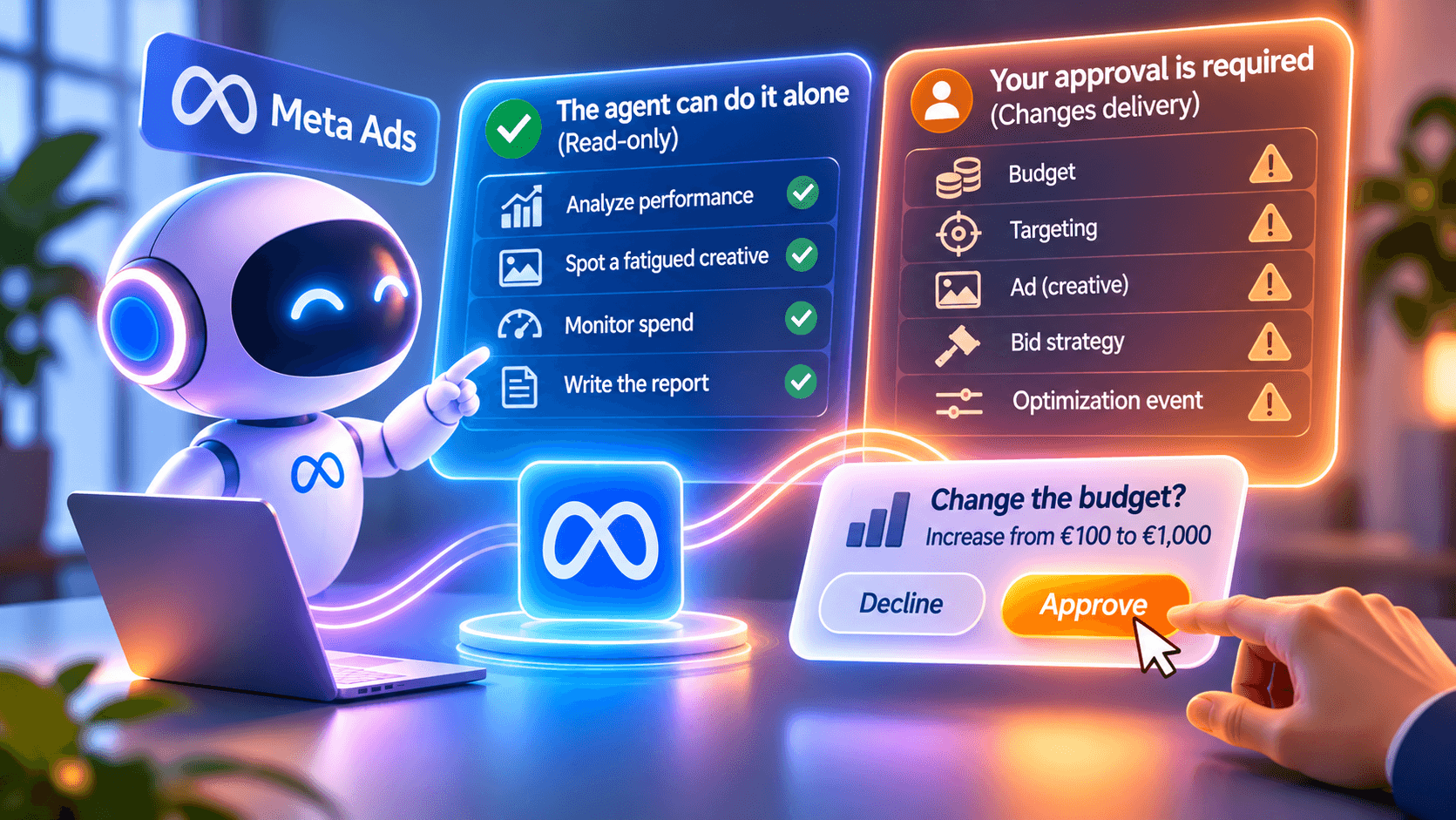
An AI agent connected to your Meta account can do anything on its own that leaves delivery unchanged: read results, spot a fatigued creative, watch spend, write the report. Anything that changes delivery (budget, targeting, ads, bid strategy, optimization event) has to go through you, because each of those edits can restart the learning phase.
The only question that matters: does delivery change?
“Agent” now covers two very different tools. One reads the account and talks to you. The other writes into Ads Manager. They are usually compared on how smart they are; the useful comparison is what happens when they get it wrong.
A wrong reading costs a wrong sentence in a report, which you fix as you read it. A wrong edit costs money already spent, and often a week of less stable delivery. Everything below follows from that asymmetry.
What an agent can do on its own
Everything that stays read-only:
- answer a question about your numbers: cost per result of an ad set, two periods side by side, spend day by day;
- flag ad sets showing “Learning limited”, the status Meta displays when an ad set does not get enough results to exit the learning phase;
- spot creative fatigue: same ad, click-through rate going down, cost per result going up;
- track spend pacing against the monthly budget;
- write the weekly report, or run a check at a set time.
None of this sends anything to Meta. Two requirements still apply: the agent must say where each number comes from (conversions attributed by Meta are not recorded sales) and say when data is missing instead of filling the gap.
What it has to ask you
Meta publishes the list of edits it treats as significant, the ones that restart an ad set's learning phase: any change to targeting, ad creative, optimization event or bid strategy, adding a new ad to the ad set, pausing for seven days or more. Budget, bid control, cost per result goal or ROAS goal count depending on the size of the change: Meta's example is a budget going from €100 to €1,000.
An ad set exits learning after about 50 results in the week following the last significant edit, and in the meantime its cost per result is usually higher. Every “small optimization” has a price, even a correct one. That is the first reason to keep control.
Three more reasons have nothing to do with the algorithm.
Money. Raising a budget commits spend. The agent sees cost per result; it does not see your cash position, this month's margin or the stock left.
Legal constraints. An ad about employment, housing, financial products and services, or a social issue, election or politics must be declared in a special ad category. Audience options are limited there, and an ad can be rejected if the category is missing. In the European Union, Meta no longer allows advertisers to create or edit ads about social issues, elections or politics. Whether your offer falls into one of these categories is the advertiser's call.
The irreversible. Deleting a campaign, an ad set or an audience cannot be undone in one click. A deletion always deserves a human who reads it first.
What Meta already automates
An agent never lands on an account free of automation. Advantage+ sales campaigns hand budget, placement and audience to Meta's delivery system, and Meta reports an average 9% improvement in cost per conversion for advertisers who used them (Meta's figure, computed on its own data). The ad rules engine pauses or adjusts ads based on conditions you wrote in advance.
Two consequences. An agent that also changes the budget of a campaign using Advantage+ campaign budget puts two hands on the same wheel: Meta notes that changing the budget or bid strategy at that level can restart learning for several ad sets at once. And an automated rule is not an agent: it is a human decision, made ahead of time, with its thresholds. An agent deciding from its own reasoning is a different matter, and that is exactly where approval is needed.
The rule to set before connecting an agent
| Action on the Meta account | Agent alone | With your approval |
|---|---|---|
| Read, compare, explain numbers | yes | |
| Flag learning limited or creative fatigue | yes | |
| Write a report, run a scheduled check | yes | |
| Pause an ad | yes | |
| Change a budget or a bid | yes | |
| Change targeting, ad or optimization event | yes | |
| Create a campaign (special category included) | yes | |
| Delete an object | yes, and read twice |
For the right-hand column, require a quantified proposal: what, where, how much, why. “Optimize the budget” cannot be approved. “Move ad set X from this budget to that one, because its cost per purchase has doubled since this date” can be approved or rejected in ten seconds.
How Pilot keeps to this rule
Pilot Ads by Braike follows this split. Pilot reads your Meta, Google Ads and TikTok campaigns and those of your other connectors, answers in conversation and prepares quantified changes. Each one arrives in a card you approve or reject: without your click on “Approve”, nothing is sent to the ad platform. Automations run at the set time, read-only. The Creatives page gives each ad a verdict, the rule behind it and the date of its fatigue.
If you are comparing with Madgicx, which centers on Meta and daily recommendations, the Pilot vs Madgicx comparison covers the differences.
If you would rather work from ChatGPT or Claude, Pilot MCP connects Meta Ads to your assistant. That case is different: on the €29 plan, your assistant creates, edits, pauses and deletes, one object at a time, and anything created or copied starts paused by default. What you ask for goes through directly. The rule in the table above is then yours to keep in your requests.
Frequently asked questions
Are Meta's automated rules an AI agent? No. They run conditions you set (a threshold, an action). They automate a decision already made, without making a new one.
Can an agent get an ad set out of the learning phase faster? Not directly. It can avoid restarting it with needless edits and point out ad sets that are too fragmented: Meta recommends combining similar ad sets so their results add up.
Does Pilot change my Meta campaigns without me? No. In Pilot, every proposed change waits for your click on “Approve”. Only Pilot MCP, on the €29 plan, sends what you ask your assistant directly.
To see an approval card on your own Meta campaigns: 7-day free trial, no credit card.
Facts about Meta checked on November 19, 2026, against the help pages listed in the sources.
Sources
- À propos de la phase d'apprentissageMeta · November 19, 2026
- Modifications importantes et phase d'apprentissageMeta · November 19, 2026
- Comment choisir une catégorie publicitaire spécialeMeta · November 19, 2026
- À propos des campagnes de ventes Advantage+Meta · November 19, 2026
- Moteur de règles publicitairesMeta for Developers · November 19, 2026
Facts checked on November 19, 2026.
Written by
Nicolas Vornière
CSO at Braike