Your morning routines, Pilot handles them on schedule.
Budgets, creatives, unusual spend, the weekly report, analyses… Schedule what you need once. Pilot takes care of the rest and lets you know the result.
Read-only: an automation never modifies your accounts.
- Meta Ads
- Google Ads
- TikTok Ads



How it works
Describe the task, or start from a template
For example: “Every morning, check how the budgets are pacing and tell me if one slips.” One sentence is all it takes.
Pick the time, the frequency, the delivery
Every day at 6:30 AM, every Monday, twice a day. The result lands in Pilot and in your channel if you pick one (email, Slack, Google Chat…).
Pilot runs the analysis and lets you know
At the set time, on up-to-date data, read-only. The result is waiting for you in the task's conversation.
Try an automation in Pilot
Pick a task, set the frequency and the time: the interactive demo below works out the next run and shows you what Pilot will deliver. The “Run” button starts the run right away.
Automations
Beta · read-only1Pick a task
2Set the frequency, time and delivery
Recurrence
Paris time
Delivery
In Pilot
A notification, plus the task's conversation.
And in a channel, via webhook
Daily spend report
Review yesterday's advertising spend, broken down by platform and by campaign. Highlight any notable changes, then write a clear report.
Next run
Tomorrow, Tuesday, October 6, at 06:00 AM
in 11 hr 20 min · Every day · 06:00
3What Pilot will deliver
On the next run, tomorrow at 06:03 AM
Fictional dataScheduled task completed: Daily spend report
The “Daily spend report” prompt ran successfully
Daily spend report
Yesterday: €1,052 spent against €1,080 in budgets, 39 purchases, €4,418 in revenue, 4.2 ROAS.
- Meta: €560, 19 purchases, 4.1 ROAS
- Google Ads: €355, 15 purchases, 4.6 ROAS
- TikTok: €137, 5 purchases, 3.6 ROAS
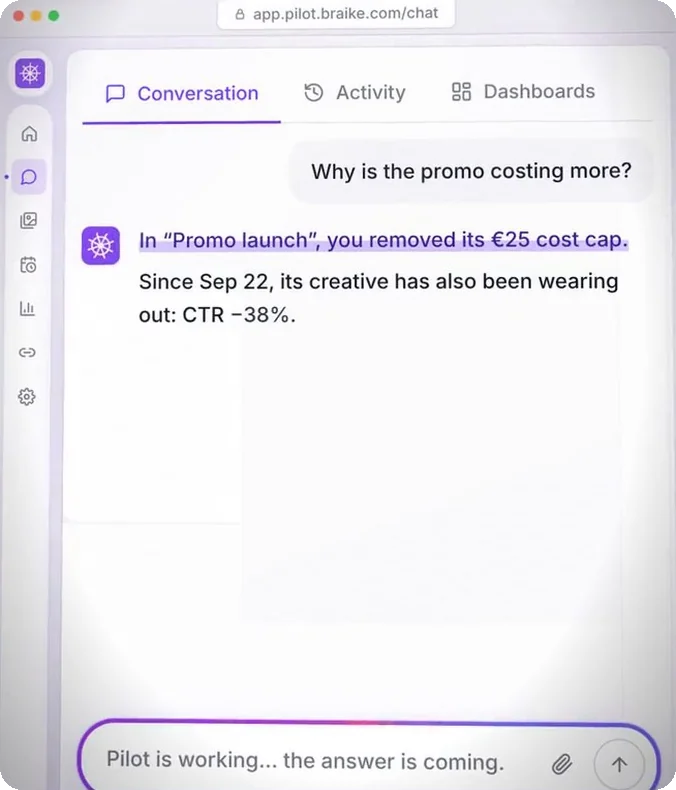
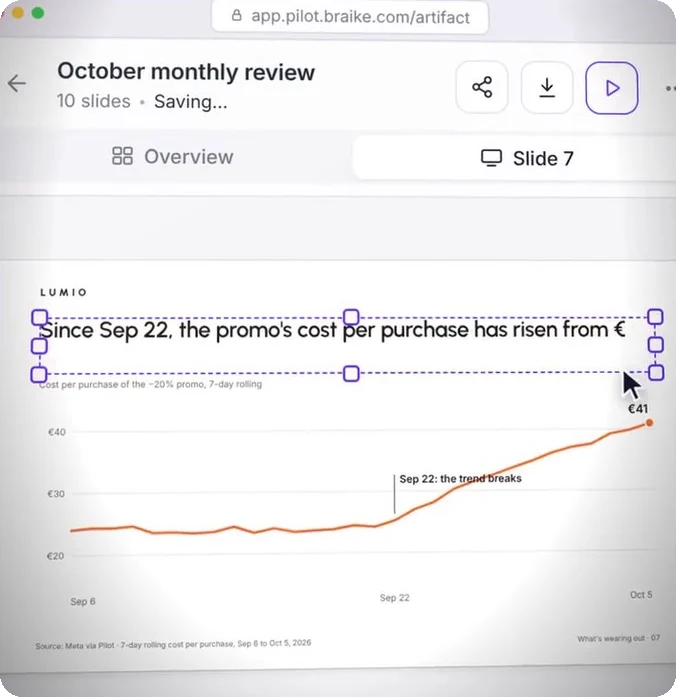
Worth noting: the −20% promo costs €41 per purchase, vs €24 before Sep 22. It took 30% of yesterday's spend.
The result is in Pilot: the notification above, plus the task's conversation, where you can ask follow-up questions.
- By email too, if you like: turn on the “Task completed” notification in your preferences.
- During the free trial, results stay in Pilot, and an automation runs at most once a day.
While you were asleep, Pilot was on watch.
This is an example. Two automations run every morning on the accounts of Lumio, a fictional brand. First thing in the morning, everything is already waiting in Pilot.
6:00 AM
Daily spend report
Yesterday's numbers, by ad platform and by campaign. At 6:03 AM: yesterday, €1,052 spent, 39 purchases, 4.2 ROAS.
6:30 AM
Morning check
The five budgets, the eighteen creatives, any spend that's out of the ordinary. At 6:34 AM, one alert: the −20% promo is wearing out, €41 per purchase vs €24 before Sep 22.
7:00 AM
You get up
The results are waiting for you in Pilot, each in its own task's conversation. Pilot hasn't changed a thing: the decision is yours.
Start from a template or from a sentence
Pilot suggests ready-to-use tasks. Click “Add” and the title, instruction and recurrence are filled in for you: adjust them and launch the automated task.
- Daily spend reportEvery day · 09:00Add
- Budget check - alert2× / day · 08:00 & 16:00Add
- Monday top campaignsEvery Monday · 08:00Add
Or describe your own, in one sentence
“Every Friday, review the live creatives and tell me what to cut, scale up or refresh.”
Before you create it, have it simulated: Pilot describes what it will look at and what it will deliver, without running anything.
PreviewCreate taskMeta creatives losing steam
Two Meta creatives are losing steam: from the first half of the month to the second, their CTR drops and their cost per purchase climbs.
- Automate
- Share
- Export PDF
- From a conversationFound an analysis useful? “Automate this analysis” runs it again on up-to-date data, as often as you choose.
- From a deliverableA dashboard or report built in the chat regenerates at the set time, with its structure and metrics intact: that's the deliverable's “Automate” button.
Set once, on time every day
Three settings, and every task shows its next run, so you know when to expect the result.
Upcoming runs
Lumio Sneakers- 06:00 AMtomorrowDaily spend reportIn Pilot
- 06:30 AMtomorrowMorning checkIn Pilot
- 08:00 AMtomorrowBudget check - alertIn Pilot
- 05:00 PMFri, 10/09Friday creative auditSlack · #ads-lumio
Last 7 days
23runs
- succeeded
- 23
- failed
- 0
Daily spend report
Recurrence
- The timeYou set it, on Paris time. Every ten minutes, Pilot checks what it needs to run, and the result is ready once the analysis is done, usually within a few minutes. “Run” executes it immediately. Pausing and resuming take one click.
- The frequencyEvery day, Monday to Friday, every Monday or every Friday, twice a day (8 AM and 4 PM), or just once, on the date you choose.
- The deliveryAlways in Pilot: a notification and the content. On top of that, a channel via webhook: Slack, Microsoft Teams, Google Chat, Discord, n8n or any webhook URL. The message includes the full report as text, plus a link to its formatted version when there is one, which opens without a Pilot account.
- Email, if you want itTurn on the “Task completed” notification in your preferences: every result is also sent to you by email. A failed run is automatically reported to you by email.
A run that fails for a technical reason is retried twice, then flagged. During the free trial, results stay in Pilot and an automation runs at most once a day.
Everything you can automate
An automation is a request you make to Pilot, run again at the set time on up-to-date data. It reads your connected accounts, compares, calculates and writes up the result.
Reports
Yesterday or last week in review: the numbers, what moved, and why.
Instruction“Summarize yesterday, by platform and by campaign.”
Checks
A budget that overruns or runs out too early, a CPA on the rise, spend with nothing to show for it.
Instruction“Tell me if a budget runs out before 6 PM.”
Creatives
Fatigue, cost per purchase, and the creatives to cut, scale up or refresh.
Instruction“Every Friday, tell me which creatives are wearing out.”
Your deliverables
The weekly dashboard, regenerated on up-to-date data, with the same structure.
In Pilot“Automate”, on the deliverable
Your analyses
The latest request in a conversation, with up-to-date data, as often as you choose.
In Pilot“Automate this analysis”, in the conversation
An automation suggests. You launch the changes.
Automations only read. If one of them decides a budget should come down or a creative should be cut, it recommends it: no change goes out to the ad platform.
Pilot · 6:34 AM
The −20% promo is wearing out: €41 per purchase vs €24 before Sep 22.
Next step: shift €100 a day to “UGC · Paris” (€20 per purchase).
Do it.
Change the budget
Meta
Ad sets, daily budget: Fall promo, €320 to €220; UGC · Paris, €250 to €350.
Nothing is sent to the ad platform without your click on “Approve”.
- 6:30 AM · The automation reads and draws a conclusion“The promo is wearing out: shift €100 a day to UGC · Paris.”
- You open the task's conversationThe result is filed there, with its numbers. You can ask follow-up questions.
- You ask Pilot, in Action modeA conversation starts in Read mode: you're the one who switches to Action mode.
- An approval card appearsApprove or Reject. Nothing goes to the ad platform without your click.
Before you launch your first automation
No. It runs read-only: it reads, compares and writes up its findings, and any write to an ad platform is blocked. To act on a recommendation, you ask Pilot in the conversation, in Action mode: it prepares a card you approve or reject.
At the time you set, within ten minutes: every ten minutes, on Paris time, Pilot checks what it needs to run. The result arrives once the analysis is done, usually within a few minutes. The “Run” button executes it right away.
Always in Pilot: a notification, plus the task's conversation, where you can ask follow-up questions. You can also send it to a channel via webhook (Slack, Microsoft Teams, Google Chat, Discord or n8n): the full report as text, plus a link to its formatted version when there is one. During the free trial, results stay in Pilot, and an automation runs at most once a day.
Turn on the “Task completed” notification in your preferences: every successful task then emails you its result, with a link to its conversation. It's off by default so your inbox doesn't fill up. A failed run is reported to you by email automatically.
If there's a technical outage, Pilot retries the run twice. If it still fails, it's marked “Failed” and you're notified. The next run goes out on time, as planned.
Yes, through a channel: a Slack or Microsoft Teams channel you share with your client receives the result every time it runs, and the link to the formatted report opens without a Pilot account.
Automations are included in the subscription: a €225 flat fee per month (excl. VAT) with one ad account included, then a per-account price that goes down with volume. Connections to the Google and Microsoft suites are not billed. The details are on the Pricing page.
Scheduled once. Checked every morning.
7-day free trial, no credit card required. In the first hour: connect an ad account, describe your automated task in one sentence, simulate it, then run it once. The result lands in Pilot, in the task's conversation.
The demo uses a fictional brand, Lumio Sneakers. Its visuals are generated and its numbers are made up.
Pilot's other features
Each of Pilot's many features comes with its own video, demo and detailed explanation.