The weekly report writes itself.

The week's numbers, what moved, why, and the three actions to take. Scheduled once, delivered every Monday.

Start free trial

Read-only: an automation never modifies your accounts.

  • Meta Ads
  • Google Ads
  • TikTok Ads
Video · 15 s9:16

The four parts of the report

The numbers
Spend, revenue, ROAS, CPA, CPL… compared with the previous week.
What moved
The week's biggest swings, campaign by campaign.
Why
What drove the changes, pulled from your accounts: budget, fatigue, bids…
The actions
Specific improvement proposals, always to approve before acting.

The operational report, a recurring chore.

Gathering the numbers, keeping up the pace, explaining what moved: three questions that come back with every report, for every client, and always take longer than planned.

  • Where are the numbers?Each platform has its own exports and its own way of measuring. Bringing everything into one document takes time and a lot of copy-pasting.Result: Hours lost before the analysis even starts.
  • How do you keep up the pace?The same report, redone every week and for every client. The structure doesn't change, but many pieces have to be pulled together by hand.Result: Reports wrapped up at the last minute, often in the evening or at the weekend.
  • Why did the numbers move?A report shows what changed, but rarely explains why. Finding the cause means digging through the accounts campaign by campaign.Result: Numbers without explanation, and decisions made on a hunch.

The week's report for “Northwind Outdoor”

A fictional brand, three weeks of made-up numbers, the real report outline. Expand each part, switch weeks, then set up the schedule.

Demo · fictional dataFictional data

Monday report · Northwind

A task on the Automations page. Pilot writes the report every week.

Fictional data

PilotGuided tour

Five steps, one minute. You can exit at any time.

Monday report · W40

Northwind Outdoor · Sep 28 to Oct 4

Delivered Monday, Oct 5 at 8:04 AM

Summary

Best week since June: €70,100 in revenue for €15,240 spent. Shopping is capped by its budget, and the Brume creative is wearing out.

Spend
€15,240
+8%vs W39
Revenue
€70,100
+21% (favorable change)vs W39
Purchases
562
+16% (favorable change)vs W39
Cost per purchase
€27.12
−7% (favorable change)vs W39
The week, day by day
Best day: Friday, €11,900 in revenue for €2,330 spent.
Spend and revenue by day, Week 40
SpendRevenue
Monday€1,980€8,100
Tuesday€2,050€8,600
Wednesday€2,110€9,100
Thursday€2,290€11,200
Friday€2,330€11,900
Saturday€2,310€11,300
Sunday€2,170€9,900
PlatformSpendRevenueROASPurchasesCost / purchase
Google Ads€6,480€34,3005.29254€25.51
Meta€6,900€27,4003.97233€29.61
TikTok€1,860€8,4004.5275€24.80
Total€15,240€70,100—562€27.12

Written by Pilot from Northwind Outdoor's Meta, Google Ads and TikTok accounts, in read-only mode.
A complete summary you can read in two minutes

Every week, the same outline in the same order. The essentials fit in a few lines, and the details are there when you need them.

The report

Monday report · W40

Northwind Outdoor · Sep 28 to Oct 4

2 min

Best week since June: €70,100 in revenue for €15,240 spent. Shopping is capped by its budget, and the Brume creative is wearing out.

Spend
€15,240
Revenue
€70,100
ROAS
4.60
Moved
Shopping · Jackets: ROAS 4.40 to 6.10
Why
Capped by budget on Thursday, Friday and Saturday
Action 1
Raise Shopping · Jackets to €600 per day
The first page of the Week 40 report: header, summary, three numbers, then one line per part.
  1. The summary up topThree lines: the week's result, and what deserves your attention.
  2. Numbers, comparedEach metric's performance is compared with the previous week, platform by platform.
  3. Names, not averagesThe campaigns and creatives that changed are named precisely.
  4. As a PDFFrom Pilot, the report exports to PDF in a click or is shared by link.

What moved, and why

Pilot compares the week with the one before, keeps the biggest swings, then looks for their cause in your accounts: budget, delivery, creative, bids.

The analysis

Shopping · Jackets

Google Ads

Moved
ROAS from 4.40 to 6.10 in one week.
Why
Budget reached on Thursday, Friday and Saturday: the campaign stopped too early, before the evening.

Brume · 15s

Meta

Moved
Cost per purchase from €29 to €38.
Why
The same people see it too often. Fatigue, and fewer and fewer clicks.

Tind · unboxing

TikTok

Moved
Cost per purchase from €31 to €22.
Why
A 2.1% CTR, versus 1.2% for the account's other TikTok videos.

The actions, ready for your approval

The report ends with three specific actions: which budget, which creative, which bid. Pilot touches nothing. You are the one who approves and launches the fixes.

Change a budget
Run action 1 from the report.

Change a budget

Google Ads

Campaign “Shopping · Jackets”: from €480 to €600 per day.

To approveRejectApprove

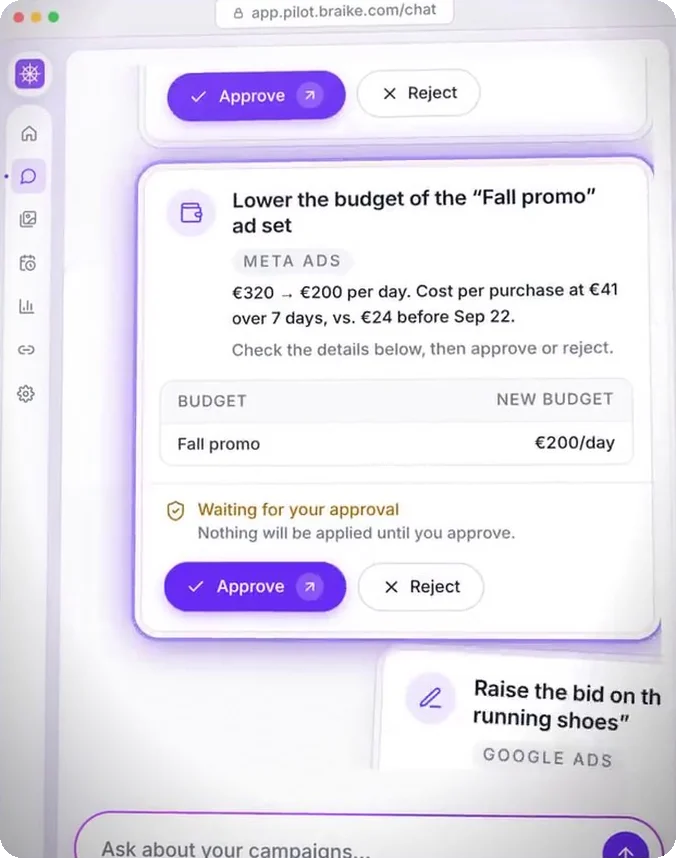
Nothing is sent to the ad platform without your click on “Approve”.

An approval card in Pilot
  1. The report suggests“Raise Shopping · Jackets from €480 to €600 per day.”
  2. You ask PilotIn the report's conversation, in one sentence.
  3. You approve the cardPilot opens a card. Nothing goes to the ad platform without your click on “Approve”.

Nothing changes without your approval. The report works read-only. Every change goes through a card you approve or reject.

Scheduled once, delivered automatically

On the Automations page, you describe the report you want, then choose the day, the time and who receives it. After that, nothing left to do: it is delivered right on time.

Scheduling

Task

Monday report · Northwind

Every Monday · 08:00

Where it lands

  • By email

    • Email it to me
    • All workspace members

    Automation succeeded - Monday report · Northwind

    The full report is attached to this email

  • And in a channel, via webhook

    • Slack
    • Microsoft Teams
    • Google Chat

    Incoming webhook8:04 AM

    Monday report · Northwind

    View the full report

  • In Pilot

    The task's conversation, plus an in-app notification.

    A notification in Pilot: the “Monday report · Northwind” task has run.

    Continue this conversation…

During the free trial, results stay in Pilot: sending by email or to a channel comes with the subscription.

Where Northwind's Monday report lands, as the Automations page composer draws it: by email, to you or to every member, with the report attached; in a Slack, Microsoft Teams or Google Chat channel, with the link to the full report; and in Pilot, a notification and the task's conversation. Sample data.
  1. By emailTo you, or to every member of the workspace, with the report attached.
  2. In the team channelSlack, Microsoft Teams or Google Chat, by webhook, with a link to the full report.
  3. In PilotEach report stays in its conversation, ready to pick up.

Every Monday, every Friday, every day, Monday to Friday, twice a day, or just once: you choose the frequency and the time. Before you create the task, a preview shows what Pilot will look at and what it will deliver, without running anything. During the free trial, results stay in Pilot, and an automation runs at most once a day.

One report per client, effortlessly

Each client has their own workspace and scheduled report. On the chosen day, all your clients get their report, with the same clear structure.

For agencies

Inbox · Monday 10/05

  • PPilot08:04Automation succeeded - Monday report · NorthwindThe full report is attached to this email.
  • PPilot08:05Automation succeeded - Monday report · LumioThe full report is attached to this email.
  • PPilot08:07Automation succeeded - Monday report · SolisThe full report is attached to this email.

Monday report · W40

Northwind Outdoor · Sep 28 to Oct 4

Delivered Monday, Oct 5 at 8:04 AMShareExport PDF
  1. 1The numbers
  2. 2What moved
  3. 3Why
  4. 4The actions

Written by Pilot from Northwind Outdoor's Meta, Google Ads and TikTok accounts, in read-only mode.
Three fictional clients, three tasks, three reports before 8:10 a.m.

Monday's inbox: three fictional clients, one report each. Then Northwind's report opened in Pilot, with its Share and Export PDF buttons, its four-part outline and its footer, written in read-only mode.
  1. One workspace per clientTheir accounts, their goals, their reports. Nothing gets mixed up.
  2. The same outline for everyoneStart from a template and keep the same structure from one client to the next.
  3. Reviewed, then sentThe report exports to PDF or is shared by link, after review.
  4. Read-onlyAn automation never modifies your clients' accounts.

Three settings, just once

  1. Connect your accounts

    Meta, Google Ads or TikTok, through the platforms' official access, read-only.

  2. Describe the report

    In one sentence, or from a template. The preview shows what Pilot will deliver before the task is created.

  3. Set up the delivery

    Choose the day, the time, the channel, the recipients. After that, nothing left to do.

Before you schedule your first report

On the day and at the time you choose: every Monday at 8 a.m. by default, or every day, on weekdays, on Fridays, twice a day, or just once... The task runs on schedule. Once it is written, the report arrives a few minutes later.

So who's writing your weekly or monthly report?

7-day free trial, no credit card required. Connect an ad account, describe the report you need, then run it once. A few minutes later, it's in Pilot.

Start free trial

The demo uses a fictional brand, Northwind Outdoor. Its visuals are generated and its numbers are made up.

Pilot's other features

Each of Pilot's many features comes with its own video, demo and detailed explanation.

Features